



Call Us Now

0044 889 555 432

Opening times

Mon - Fri 9.00 - 18.00

Fale Conosco

027 999412476

Horário de funcionamento

Seg - Sex 7:00 as 18:00
  • Educação que
    inspira o mundo

    é o lema que guia a Colorear Educação Infantil. Acreditamos que a educação é a base para um futuro promissor, e por isso, oferecemos um ambiente acolhedor e estimulante, onde as crianças podem desenvolver todo o seu potencial.
  • O futuro se pinta
    de conhecimento!

    o compromisso de oferecer um ensino de qualidade, que vai além do aprendizado tradicional. Na Colorear, as crianças aprendem a pensar, criar e se expressar, construindo o conhecimento que irão usar para pintar um futuro brilhante.

Berçario

Amor, cuidado e estímulos para os primeiros passos do seu bebê. Um ambiente seguro e acolhedor, onde a felicidade floresce.

Integral

Um dia inteiro de aprendizado e diversão! Estimulamos a curiosidade, a criatividade e a autonomia, com atividades lúdicas e educativas.

Matutino

Manhãs de descobertas e aprendizado! Começamos o dia com muita energia, explorando o mundo através de brincadeiras e atividades.

Vespertino

Tardes de conhecimento e alegria! Finalizamos o dia com um sorriso no rosto, prontos para novas aventuras e aprendizados.

Aprender, Pensar, Sonhar e Criar!

Com foco nas crianças e suas famílias, oferecemos um ambiente seguro e acolhedor. Valorizamos o aprendizado criativo, alimentação saudável, turmas reduzidas e comunicação próxima, garantindo uma formação completa e divertida.

Ambiente Acolhedor e Seguro

Nossa escola possui ambientes pensado para nossos alunos e cameras.

Saúde e Atenção

Nossas crianças recebem alimentação saudável e turmas reduzidas.

Flexibilidade para Famílias

Flexibilidade de horários e interação e comunicação constante.

Desenvolvimento Completo

Atividades focadas no desenvolvimento através de experiências criativas.

Inglês, Arte, Música e Esportes

A criança aprende, se diverte e se desenvolve de forma completa.

Empreendedorismo Infantil

Estimulamos e incentivamos a criatividade e a autonomia.

Testemunhos

  • Sed hendrerit quam sed ante euismod posu. Mauris ut elementum ante. Vestibuel suscipit convallis purus
    mattis magna sapien, euismod convallis sagittis quis euismod posu. Vivamus id mi
    non quam congue venenatis et at lorem vitae suscipit.
  • Mauris ut elementum ante. Vivamus id mi non quam congue venenatis et at lorem. Ut ullamcorper odio id
    metus eleif tincidunt consequat vitae suscipit magna. Proin ante arcu, aliquam nec
    rhon sit amet, consequat vitae odio id suscipit magna.
  • Lorem ipsum dolor sit amet, conse adipiscing elit. Maecenas mauris orci, pellentesque at vestibulum quis,
    porttitor eget turpis. Morbi porta orci et augue sollicitudin cursus ut eget ligula.
    Etiam eu sapien at purus ultricies tempor.

It's easy to get started creating your website. Knowing some of the basics will help.

What is a Content Management System?

A content management system is software that allows you to create and manage webpages easily by separating the creation of your content from the mechanics required to present it on the web.

In this site, the content is stored in a database. The look and feel are created by a template. Joomla! brings together the template and your content to create web pages.

Logging in

To login to your site use the user name and password that were created as part of the installation process. Once logged-in you will be able to create and edit articles and modify some settings.

Creating an article

Once you are logged-in, a new menu will be visible. To create a new article, click on the "Submit Article" link on that menu.

The new article interface gives you a lot of options, but all you need to do is add a title and put something in the content area. To make it easy to find, set the state to published.

You can edit an existing article by clicking on the edit icon (this only displays to users who have the right to edit).

Template, site settings, and modules

The look and feel of your site is controlled by a template. You can change the site name, background colour, highlights colour and more by editing the template settings. Click the "Template Settings" in the user menu.

The boxes around the main content of the site are called modules. You can modify modules on the current page by moving your cursor to the module and clicking the edit link. Always be sure to save and close any module you edit.

You can change some site settings such as the site name and description by clicking on the "Site Settings" link.

More advanced options for templates, site settings, modules, and more are available in the site administrator.

Site and Administrator

Your site actually has two separate sites. The site (also called the front end) is what visitors to your site will see. The administrator (also called the back end) is only used by people managing your site. You can access the administrator by clicking the "Site Administrator" link on the "User Menu" menu (visible once you login) or by adding /administrator to the end of your domain name. The same user name and password are used for both sites.

Learn more

There is much more to learn about how to use Joomla! to create the web site you envision. You can learn much more at the Joomla! documentation site and on the Joomla! forums.


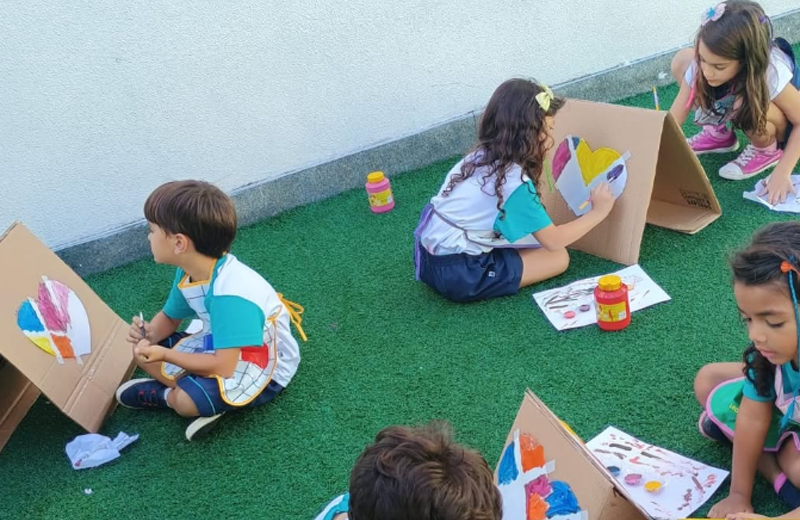
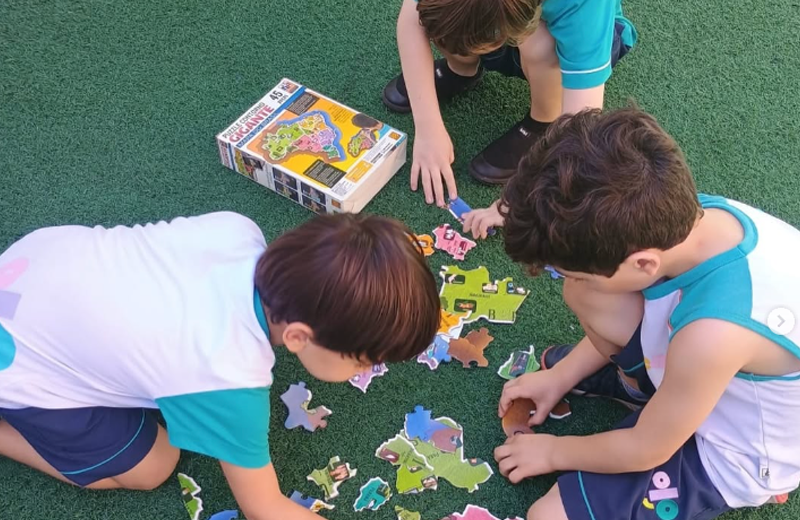
Atividades do dia a dia

Na Colorear, acreditamos que a infância é um arco-íris de possibilidades, e cada cor representa uma nova descoberta. Por isso, oferecemos um mundo de atividades lúdicas e educativas que estimulam o desenvolvimento completo da criança, explorando suas habilidades motoras, criativas, sociais e emocionais.